New LinkedIn Job Malware: How a Fake $400K Offer Tried to Infect My Mac (Full macOS Analysis)
A “too good to be true” $400K job on LinkedIn almost turned into a full macOS compromise. The recruiter looked real, the company was real, and the job description was tailored to my blockchain and protocol background—but the script they asked me to run was pure malware. In this article I break down the attack chain, show you the exact curl command, explain how the script creates persistence via LaunchAgents, and give you practical steps to detect and remove similar threats from your Mac.
Welcome to Hoken Tech.
In November 2025, I received what looked like a dream message on LinkedIn.

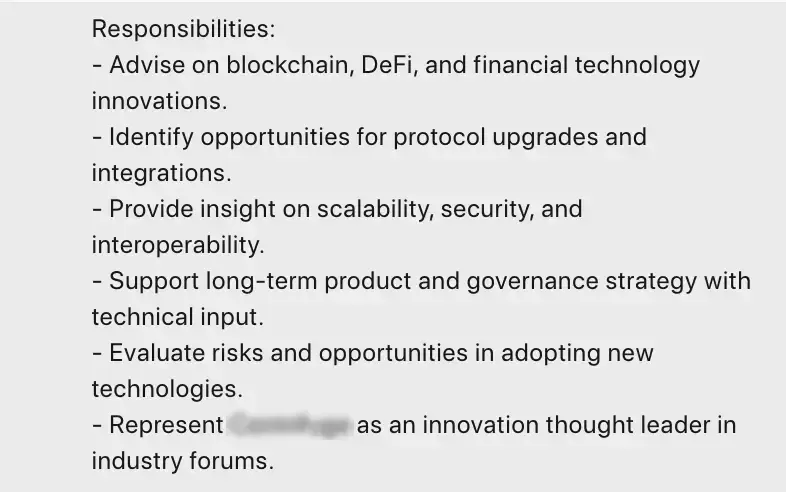
A professional profile claiming to represent a well-known blockchain company contacted me with an attractive opportunity: a Technology Innovation Advisor role with a $375K–$425K salary, token incentives, and a flexible remote structure.
The message was polished.
The job spec looked legit.
The company name was real.
But one thing was not.
This “recruiter” sent me a link to send more info and to solve a webcam issue they force you to download a “skills assessment patch” — a file disguised as a harmless macOS update script.
What it actually contained was a malware designed to infect macOS devices, establish persistence, and remotely execute additional payloads.
This is the full investigation: how I spotted it, how I analyzed the malicious script, and how you can protect yourself — even if you’re not technical.
The Setup: A Social-Engineering Scam Targeting Experts
The scammer’s message included:
A real company name
A real blockchain project
A legitimate-looking job description
A corporate tone and branding
A believable salary
A “skills validation” file hosted on a professional-looking domain
This wasn’t a random phishing email, it was spear-phishing, tailored exactly to my expertise (blockchain + protocol architecture), and that’s what makes this attack so dangerous.
The Suspicious Command That Gave It Away
At this point the recruiter send a message with a link to follow to complete and send more info:
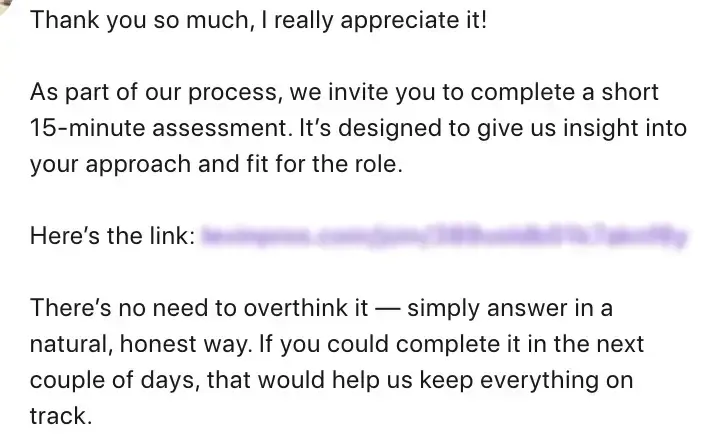
By following the link, it takes us to a simple registration page, where we enter our email and password, and a profile is created with 3 simple questions to answer. Then, moving on, we find a button to record a video of ourselves, but apparently it doesn’t work, and we’re asked to download an update for the webcam:

In fact, we are shown a command to run inside our terminal, and if we do this, we will get infected, but without reporting the complete code of the command, here is what it does in detail:
curl -k → download a file while ignoring SSL certificate problems (red flag)
save into /var/tmp → a location often used by malware
chmod +x → make it executable
nohup and >/dev/null 2>&1 & → execute it silently in the background
bash script → run whatever is inside (payload, persistence, more downloads)
This is classic malware execution behavior.
What Was Inside the File? (cdrivMac.sh)
Perhaps not everyone knows that Hoken Tech’s CTO, with over 14 years of programming experience, created an initial prototype for spam and virus recognition using machine learning in 2016. This system filtered messages in emails and organized them in a database.
When opened, the script displayed:
✔️ System Architecture Fingerprinting
Check if your Mac is Intel or ARM:
if [[ "$(uname -m)" == arm64 ]]; then
DOWNLOAD_URL="..."
Malware often adapts payloads based on hardware.
✔️ Downloads a secondary payload
The script downloads a ZIP archive containing:
Shell script
An app bundle
Possibly a hidden binary
✔️ Creates a persistent launch agent
Creates or modifies a .plist file in:
~/Library/LaunchAgents/
This forces the malware to launch at every login.
This is exactly how persistent threats work on macOS.
✔️ Silent execution of secondary scripts
bash drivfixer.sh
open MediaPatcher.app
Launching background processes is another hallmark of droppers.
VirusTotal Investigation
Using various services, such as VirusTotal, it’s possible to upload the suspicious file for detailed analysis. It also allows you to run it in a protected environment to analyze the script’s entire behavior and understand what is called, what is downloaded, and how it behaves.
The analysis obviously revealed suspicious behavior, as it downloads a file with a name different from the one specified in the command, installs itself in specific folders, can be executed remotely, and other undesirable behaviors.
OSINT Checks on the LinkedIn Profile
Here’s what you should always do:
🔍 Reverse image search of the profile photo
Fake recruiters often use:
Photos of influencers from Instagram
Photos from Asian travel blog
AI-generated portraits
🔍 Check the consistency of the work history
Are the dates, roles, and companies plausible?
🔍 Compare with real company employees
LinkedIn shows “People who work at X” — check if the recruiter appears there.
🔍 Look for mutual connections
Most fake recruiters have…
➡️ almost no common contacts
➡️ or dozens of random crypto founders added in bulk
🔍 Check the domain registration
The site seemed legitimate, but the registration data often gives away clues:
Recently registered? In this case, registered just a week ago, on November 20, 2025
No online presence for the company?
Connected to suspicious hosting providers?

How to Check Persistence on macOS (If You Clicked Something)
Even if you haven’t run the script, here’s how to check your Mac.
1. Launch Agents
This type of malware installs itself here:
~/Library/LaunchAgents/
Search for unknown files.
2. LaunchDaemons
/Library/LaunchDaemons/
Suspicious names, random strings, or files like “update,” “patch,” or “helper” = red flag.
3. Login Items
System Settings → General → Login Items
Remove anything suspicious.
4. Running Processes
Open Terminal:
ps aux | grep -i driver
ps aux | grep -i patch
5. Check for unsigned apps
spctl --assess --verbose /path/to/app
Unsigned tracks = danger.
How to block the domain (system-wide)
Add this to your /etc/hosts file:
127.0.0.1 name domain.com
127.0.0.1 other name domain.com
or with 0.0.0.0:
0.0.0.0 name domain.com
This prevents any malware from connecting to the attacker.
Why this attack is so dangerous
This is not an amateur scam.
It uses:
✔️ Social engineering
✔️ Real company brands
✔️ Custom job descriptions
✔️ Mac-specific malware dropper
✔️ Persistence and silent execution
✔️ Payloads hosted on Cloudflare (harder to block)
This is a professional operation, likely part of recent campaigns targeting:
Developers
Blockchain experts
AI engineers
Executives
Researchers
Startup founders
Precisely people with access to valuable assets.
Final Recommendations
If a recruiter sends you a file:
❌ Don’t download it
❌ Don’t run it
❌ Don’t chmod +x
❌ Don’t run terminal commands they send you
If they insist you run a script or patch, it’s 100% a scam. Legitimate companies NEVER ask candidates to run code on their machine.
Always check:
✔️ VirusTotal
✔️ Domain registration date (whois)
✔️ LaunchAgents
✔️ Unsigned apps
✔️ The recruiter’s LinkedIn connections
✔️ The company’s HR directory
No. No legitimate company does this.
Yes. macOS is based on UNIX — scripts can:
Download payloads
Install launch agents
Execute binaries
Create persistence
Exfiltrate data
Yes. It disables SSL/TLS verification — very common in malware downloads.
Yes. Just downloading it doesn’t do anything.
Absolutely. New malware often starts with 0 detections. Behavioral analysis is more revealing.
Yes. Attackers target many people at once.

nft, hoken tech, blockchain, cryptoart, eos, nft art, artificial intelligence, ai, watch authentication, crypto artist, nfts, web3, nft game, web3 game, videogame, nft distributor, videogame blockchain