Punycode Phishing: How One Fake Letter in a URL Can Destroy Your Company


A step-by-step tutorial on detecting, preventing, and responding to homograph domain threats
Picture this: one of your employees receives an email from what looks like your company’s bank. The sender address checks out.
The link in the email points to a domain that reads exactly like the bank’s real URL in the address bar. Everything looks legitimate. But it isn’t. That single Cyrillic “а” swapped in for a Latin “a” just handed an attacker your employee’s credentials — and they never saw it coming.
This is the reality of punycode homograph attacks, and if you work in cybersecurity, understanding how they operate and how to stop them isn’t optional anymore. Let’s walk through everything you need to know, from the technical foundations to the defensive playbook you can implement starting today.
What Is Punycode, Really?
The Domain Name System — the phonebook of the internet — speaks only ASCII. It understands the 26 letters of the English alphabet (a–z), digits 0–9, and hyphens. That’s it. No umlauts, no Chinese characters, no Cyrillic script.
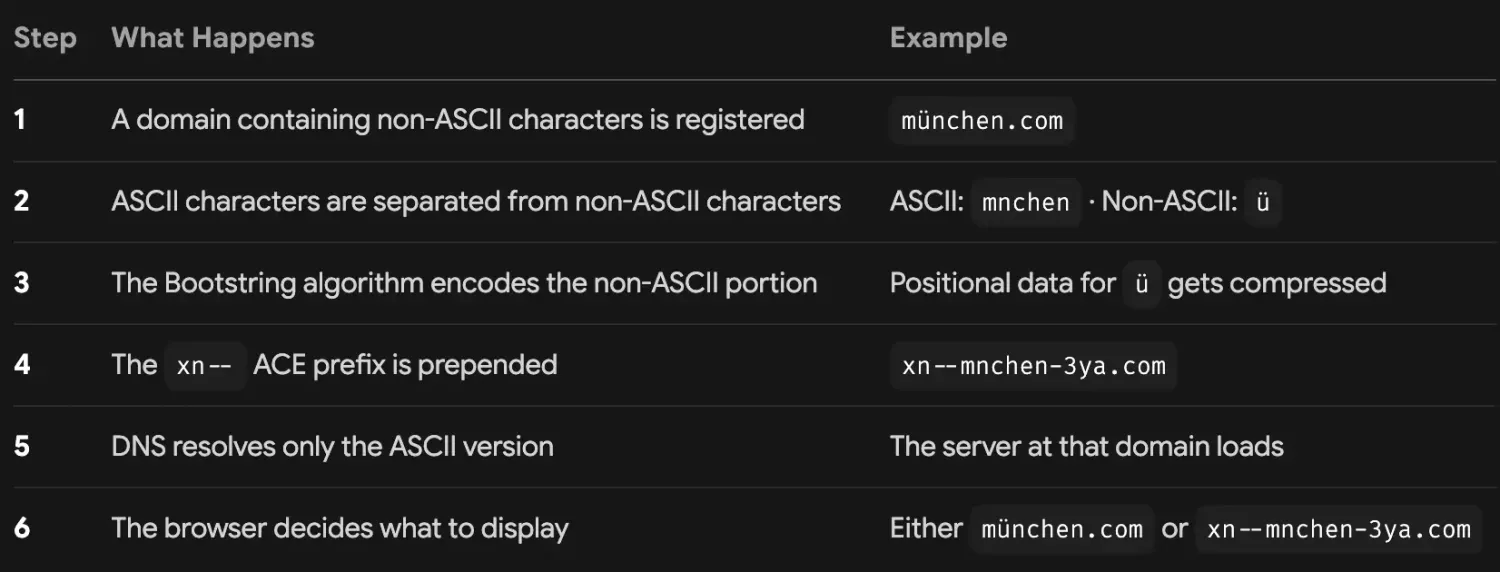
But the internet is global. A business in Munich wants münchen.com. A company in Moscow wants мockвa.com. So the engineers at the IETF created Punycode, defined in RFC 3492, as a bridge between Unicode-rich domain names and the ASCII-only DNS infrastructure.
Here’s the encoding pipeline in its simplest form:
Why This Creates a Security Nightmare
Unicode contains thousands of characters across dozens of scripts. Many of them are visually identical to ASCII letters in standard browser fonts. Here are the most commonly abused look-alikes:
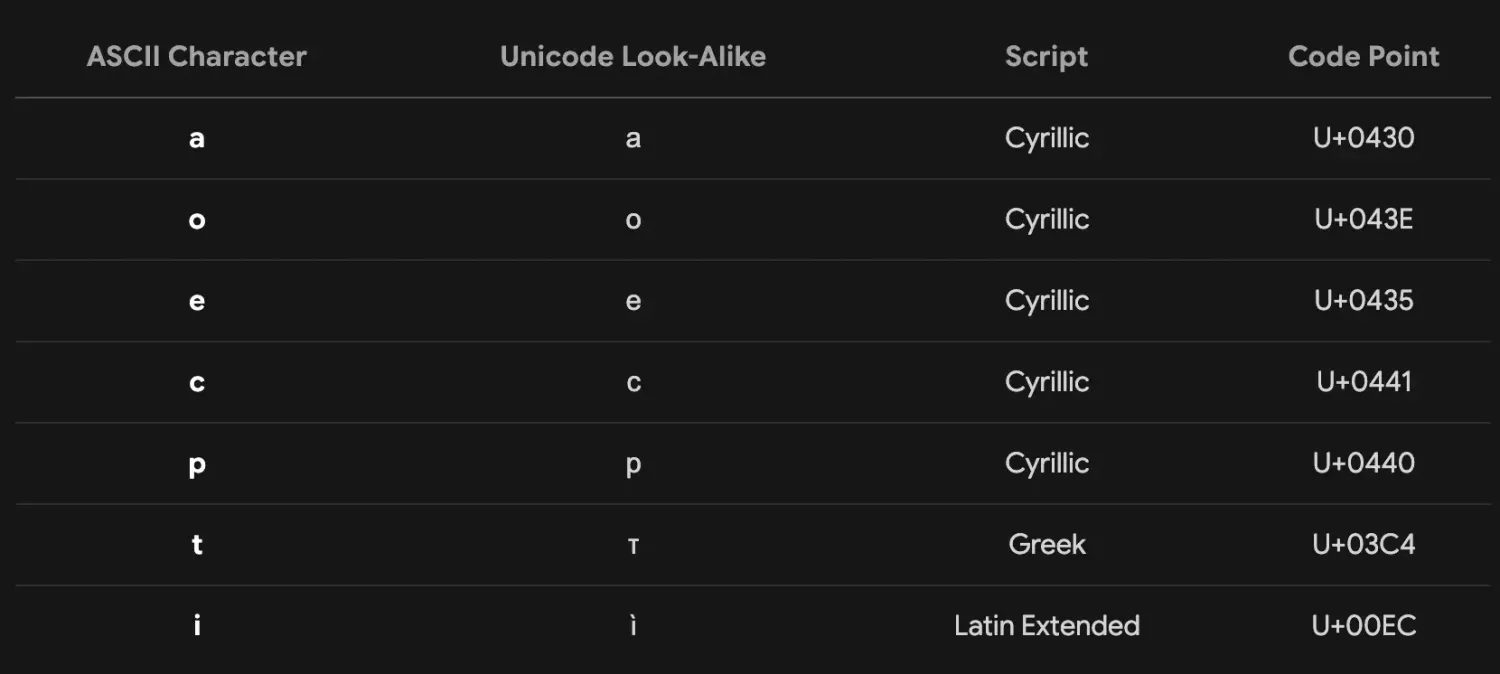
An attacker doesn’t need to spoof every character. One swapped letter is enough. The domain `xn — pple-43d.com` renders as `аррӏе.com` — and to the human eye scanning an address bar, that’s `apple.com`.
How Attackers Weaponize Punycode
Homograph attacks aren’t theoretical. They’re active, they’re effective, and they follow a predictable playbook. Here’s the anatomy of a typical campaign.
Domain Registration
The attacker identifies a high-value target domain — a bank, a SaaS platform, an email provider, or your own company’s domain. They then register a homograph variation using look-alike Unicode characters. The registration costs roughly USD 10–15. The potential return from harvested credentials can reach thousands.
Real-world example: Attackers registered `cоinbase.com` using a Cyrillic “о” and launched a credential-harvesting campaign that successfully lured victims to a pixel-perfect phishing page.
Infrastructure Setup
The attacker builds a convincing replica of the legitimate website. Modern phishing kits make this trivial — they clone the target site’s HTML, CSS, and images in minutes. The fake site will have:
A valid SSL certificate (Let’s Encrypt issues them automatically)
Matching branding and layout
Functional login forms that capture credentials before redirecting victims to the real site
Delivery
Victims are directed to the homograph domain through:
Phishing emails that pass visual inspection because the domain “looks right”
Search engine ads pointing to the spoofed domain
Compromised legitimate sites that redirect to the attacker’s server
Business email compromise where the attacker impersonates an executive using a look-alike domain
Exploitation
When victims land on the fake site and enter credentials, the attacker captures everything — usernames, passwords, MFA tokens if the phishing page is sophisticated enough to relay them in real time, and session cookies. The credentials are either used immediately for account takeover or packaged and sold on dark web marketplaces.
Why Traditional Defenses Fail
Punycode attacks exploit gaps in conventional security stacks:
Secure Email Gateways scan for known malicious domains. A freshly registered homograph domain won’t appear on any blocklist.
URL rewriting and link scanning may not fully decode punycode before analysis.
User training that says “check the URL before clicking” fails when the URL looks correct.
Mobile devices compound the problem — smaller screens, no hover-preview capability, and inconsistent browser behavior make detection nearly impossible for end users.
Detection — How to Spot a Punycode Attack
Now the practical part. Here’s your detection toolkit, arranged from quick wins to deeper analysis.
Hunt for the `xn — ` Prefix
This is your fastest indicator. If you see `xn — ` at the start of a domain segment, you’re looking at punycode. Train your team to treat any unexpected `xn — ` prefix in a business context as suspicious.
Example: `https://xn--paypl-7ve.com/login` — that’s not PayPal, no matter what the browser renders.
Configure Browsers to Show Raw Punycode
This is the single most impactful configuration change you can make. Instead of letting the browser render Unicode, force it to display the raw punycode string.
Firefox:
Navigate to `about:config`
Search for `network.IDN_show_punycode`
Set the value to `true`
Chrome and Edge: Modern versions (Chrome 75+, Edge 79+) now display punycode by default for domains that mix scripts from different languages. Keep these browsers updated to benefit from these built-in protections.
Safari: Safari continues to render Unicode by default, making it the most permissive major browser for homograph attacks. If your organization uses macOS or iOS devices, pay extra attention to DNS-layer defenses.
Hover Before You Click — Every Single Time
This isn’t a technical control, but it’s essential. Before clicking any link in an email — even one that appears to come from a trusted source — hover over it and inspect the status bar. Look for:
The `xn — ` prefix
Unusual characters in the domain
Domains that don’t match the expected destination
Subdomains designed to confuse (e.g., `login.microsoft.com.phishing-site.com`)
Use Online Punycode Decoders
When you encounter a suspicious domain, paste it into a decoder to reveal the actual Unicode characters. Several free tools are available:
Mathias Bynens’ punycode.js converter
Various browser extensions that decode punycode on demand
Monitor Certificate Transparency Logs
Certificate Transparency logs are public records of every SSL certificate issued. By monitoring these logs for domains that closely resemble your organization’s domain — especially those containing Unicode characters — you can detect impersonation attempts before an attack launches. Tools like CertSpotter and crt.sh make this straightforward.
Deploy DNS Filtering with Homograph Intelligence
DNS security solutions can flag newly registered domains, domains using mixed scripts, and domains that closely match your organization’s brand. This catches homograph domains at the resolution layer, before a connection is ever established.
Protection — Your Layered Defense Playbook
Detection finds the threat. Protection stops it. Here’s a defense-in-depth strategy organized by layer.
Browser and Endpoint Configuration
Mandatory settings for all organizational browsers:
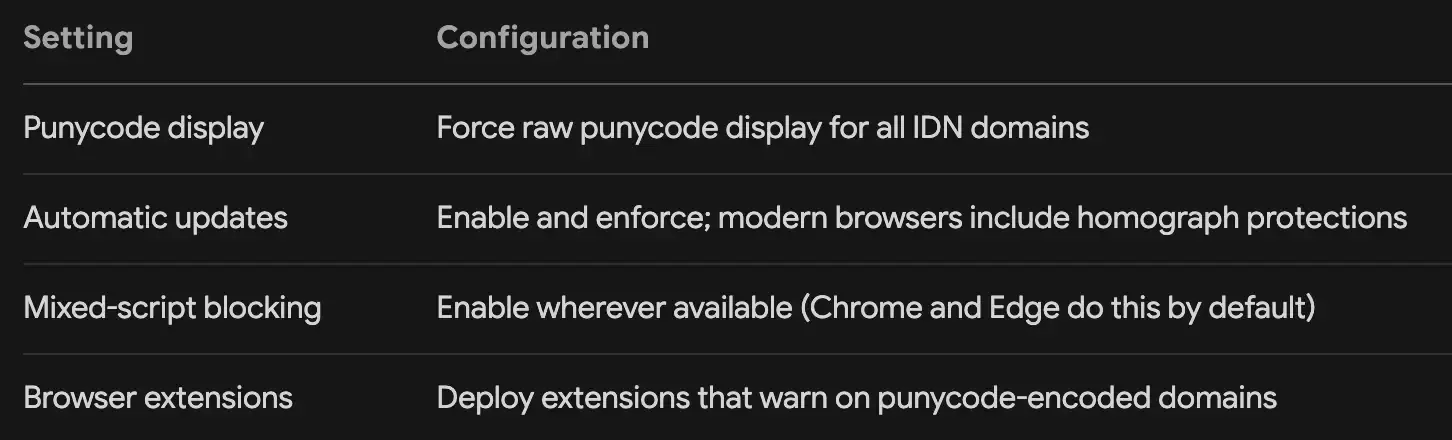
Group Policy and MDM: Push these settings through Group Policy for Windows endpoints and through your MDM solution for macOS and mobile devices. Don’t leave browser configuration to individual users.
Email Security
Your email gateway should:
Decode punycode before analyzing URLs — if your gateway can’t do this, evaluate alternatives
Flag or quarantine messages containing links to newly registered domains
Apply heightened scrutiny to emails containing `xn — ` in any URL
Integrate with threat intelligence feeds that include homograph domain indicators
Authentication protocols matter too. Implement DMARC, SPF, and DKIM with a policy of `p=reject` for your primary domains. This prevents attackers from spoofing your domain in the `From` header, even if they register a homograph variation for the link.
DNS Security and Filtering
Deploy a DNS filtering solution that:
Maintains blocklists of known homograph domains
Flags domains registered within the last 30 days
Alerts on domains that use mixed Unicode scripts
Blocks resolution to newly observed domains by default (with a transparent override process)
Proactive domain registration: Register common homograph variations of your primary domain yourself. For each critical domain, register versions that substitute Cyrillic, Greek, and Latin Extended characters for each ASCII letter that has a look-alike. This is inexpensive — typically USD 10–20 per domain per year — and prevents attackers from claiming them.
Endpoint Detection and Response
Your EDR platform should:
Monitor DNS queries for connections to homograph domains
Alert on browser processes connecting to domains with `xn — ` prefixes
Integrate threat intelligence that includes punycode-based indicators of compromise
Provide visibility into the full chain of a phishing attack — from email link click to credential harvest
Security Awareness Training
Technology can’t catch everything. Your people need to understand this threat.
Training modules should cover:
What punycode is and why it exists — demystify the technology
The hover-before-you-click habit — make it muscle memory
How to read a decoded URL — show real examples of homograph domains
The limits of visual inspection — emphasize that a correct-looking URL can still be malicious
What to do when they suspect a homograph attack — clear reporting procedures
Simulated phishing exercises: Include homograph domains in your phishing simulations. Use actual punycode domains (registered by your team, pointing to a training page) so employees experience what these attacks look like in practice. We recommends this as one of the most effective training methods because it creates a memorable, visceral learning experience — seeing a familiar brand name rendered from an `xn — ` domain leaves a lasting impression.
Quick-Reference Detection Checklist
Print this, share it, keep it handy. When you or your team encounter a suspicious link, run through these checks:
[ ] Does the URL contain `xn — ` anywhere in the domain portion?
[ ] When you hover over the link, does the displayed destination match the expected domain exactly?
[ ] Is the domain using characters from multiple scripts (e.g., Latin mixed with Cyrillic)?
[ ] Was the domain registered recently? (Check with a WHOIS lookup)
[ ] Does the SSL certificate’s subject match the expected organization name?
[ ] Are there subtle visual differences in the rendered domain — dots placed oddly, characters that look slightly off?
[ ] Did the link arrive through email or an external message rather than being typed directly or accessed via bookmark?
If you answer “yes” to any of the first four questions, treat the link as malicious until proven otherwise.
Building Long-Term Resilience
Defending against punycode attacks isn’t a one-and-done project. It’s an ongoing discipline. Here’s how to operationalize it:
Weekly: Review certificate transparency logs for domains resembling yours. Check your DNS filtering dashboard for blocked homograph look-alike queries.
Monthly: Run a simulated homograph phishing campaign. Track click rates and adjust training accordingly. Review browser configuration compliance across your fleet.
Quarterly: Audit your domain portfolio. Have any new homograph variations been registered by third parties? Update your defensive registrations. Review your email gateway’s punycode handling capabilities.
Annually: Conduct a full red-team exercise that includes punycode-based attack scenarios. Test every layer of your defense — email, DNS, endpoint, and human response. Document gaps and build a remediation roadmap.
The Bottom Line
Punycode was built to make the internet more inclusive, and it succeeded at that. But that inclusivity created a blind spot that attackers have exploited with remarkable success. The good news: the defenses are well-understood and, for the most part, straightforward to implement.
Start with your browsers — force punycode display organization-wide. Layer on DNS filtering, email security, and EDR integration. Train your people relentlessly. And never stop watching for that seemingly innocent `xn — ` prefix. In a homograph attack, the difference between a legitimate domain and a phishing site is invisible to the human eye — but it doesn’t have to be invisible to your security stack.
Key takeaways to remember:
Punycode is legitimate infrastructure — it’s not inherently malicious, but its abuse is devastatingly effective
One substituted character is all it takes — you don’t need to spoof an entire domain to fool most users
Browser configuration is your fastest win — force raw punycode display and gain immediate visibility
Defense must be layered — no single control stops these attacks; combine browser, email, DNS, endpoint, and human defenses
Training must go beyond “check the URL” — teach your team how to check, not just that they should check

nft, hoken tech, blockchain, cryptoart, eos, nft art, artificial intelligence, ai, watch authentication, crypto artist, nfts, web3, nft game, web3 game, videogame, nft distributor, videogame blockchain